A modern, mobile-friendly design
Review property information from your phone, tablet, or station workstation. Property Insights brings a new design to the Site Survey tools you already use.
-1.png)
Bryx Web | Property Insights
Bring property details into your emergency response. Property Insights extends Site Survey in Bryx Web with mobile access, field submissions, and property templates so your crew can review hazards, access points, and preplan information when a call comes in.

Site Survey → Property Insights
Review property information from your phone, tablet, or station workstation. Property Insights brings a new design to the Site Survey tools you already use.
Give authorized responders a way to submit hazards, photos, and field observations during or after an incident. Your agency reviews submissions before they become part of the property file.
See when property data was last updated and identify information that needs review. Your field personnel can review and validate details for future responders.
Create templates with custom fields for similar property types. Keep the information your crew needs consistent across your district.
Control which property information you share with mutual aid partners and which details remain visible only to your agency members.
View hazards, access points, utilities, and other points of interest at and around the incident location to support your on-scene decisions.
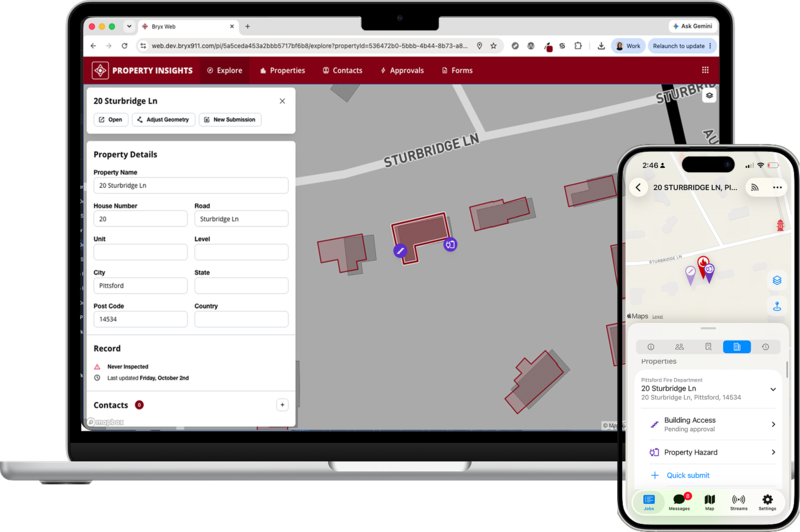
Your responders see property conditions firsthand. Quick Submissions let authorized personnel document those observations in the field, with agency review before the information reaches the property file.
Receive a job through Bryx Mobile and view critical property information associated with the call.
Initiate a Quick Submission when you encounter a hazard or another property detail that needs recording.
An agency manager reviews the submitted data for accuracy and relevance before adding it to the property file.
Approved information updates across the app, with fresh, verified indicators available to your responders.
Property templates
Build templates for apartment buildings, school campuses, strip malls, and other properties in your district. Define custom fields so similar properties include the information your agency needs.
Apartment buildings
School campuses
Strip malls and retail campuses
Big box stores
Discounts available for volunteer agencies
Property Insights updates and extends Site Survey as a module within Bryx Web. You get a mobile-friendly design alongside Quick Submissions, update timestamps, templated property files, sharing controls, and mapped points of interest. Your crew can access property details alongside emergency response information.
Authorized responders can submit hazards, photos, and other field observations through Quick Submissions. An agency manager reviews the new information for accuracy and relevance. Once approved, the property file updates across the app, with fresh, verified indicators available to your responders.
You control which property information is shared with your mutual aid partners and which remains private to your agency members. Property Insights gives you shared and private data options so you can make relevant property details available while keeping agency-only information restricted.
You can create and manage property templates with custom fields for the property types in your district. Use templates for apartment buildings, school campuses, retail campuses, or big box stores to keep data entry consistent and capture the information your crew needs.
BOOK A DEMO
Explore Quick Submissions, property templates, and sharing controls with our team. Tell us about your department to discuss adding Property Insights to your agency.